
Style across brands
Looks across brands: AI styling for multi-brand retailers and concept stores
For multi-brand stores, mixNmatch builds outfits that combine pieces from different brands in your range, cleans up mixed supplier data and makes the curated assortment searchable by style.
For boutiques and concept stores on Shopify, and for multi-brand retailers, department stores and marketplaces via our REST API.
How do looks work across brands?
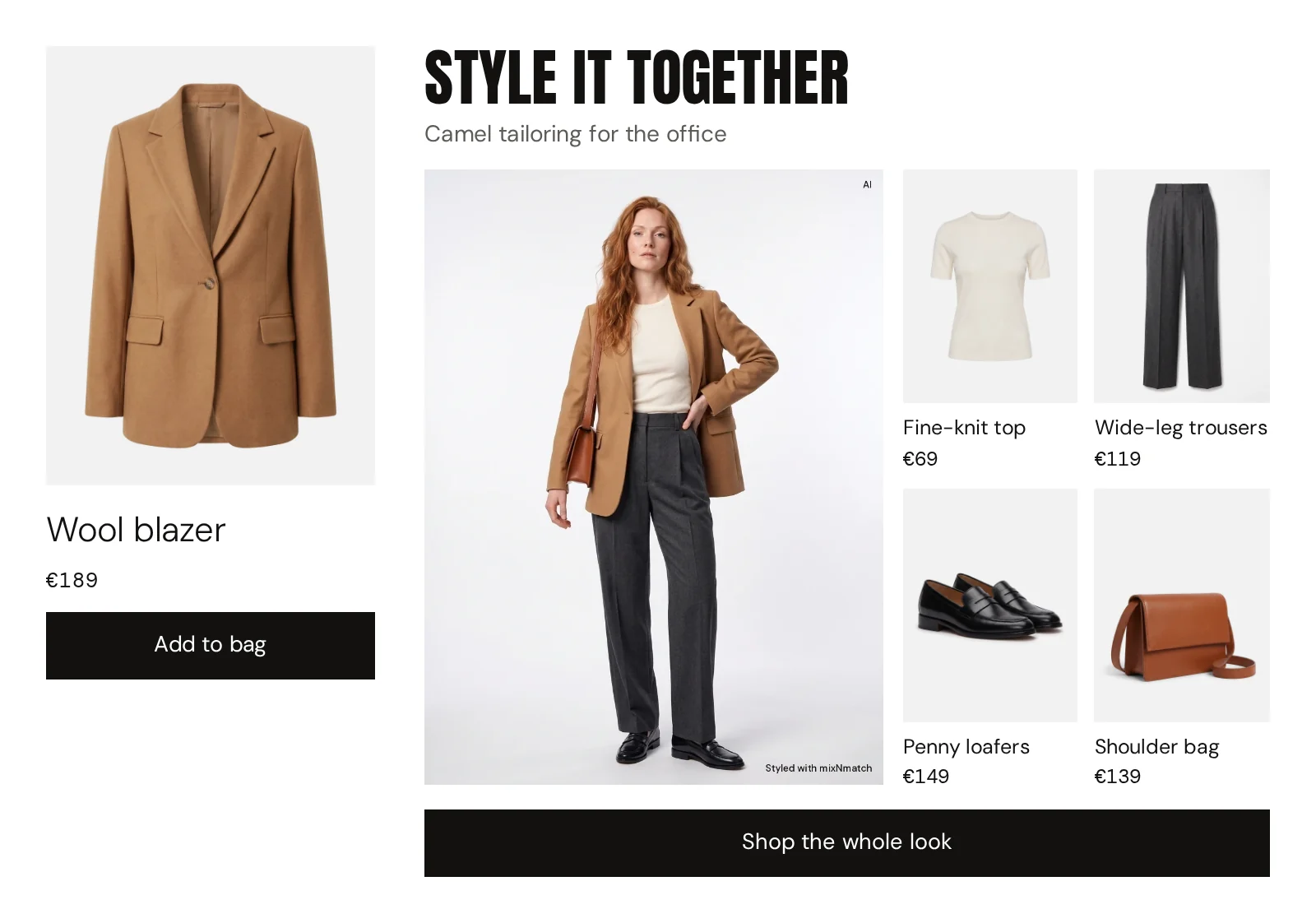
In a multi-brand store, the best outfit rarely comes from one label. mixNmatch builds looks across all brands in your range: sneakers from one brand, chinos and a knit from another, a belt from a third.
Read more
Every look uses only products you carry, follows your curation and replaces sold-out items. On the product page, in the cart and in search, the shopper sees how pieces from different brands work together, which turns your curation into a reason to buy more than one item.
How do you clean up mixed feeds from many suppliers?
Every supplier describes products differently: one calls a colour “navy”, the next “dark blue”, a third leaves it out.
Read more
Smart Product Tags reads every product and adds the same set of attributes, style, occasion, fit, material, design details, season and colour family, wherever the data came from, and maps categories to one standard taxonomy.
The result is one consistent catalogue that your search, your filters and AI assistants can work with; new deliveries join it automatically.
How does search help a curated range?
Shoppers in a multi-brand store often do not know which brand they want; they know the occasion.
Read more
AI search lets them describe it, for example “relaxed outfit for a city weekend”, or upload an image, and answers with products and complete looks across your brands. Smart Filters narrow results by style, occasion or fit.
Because search runs on the same enriched data, it finds products from smaller labels as reliably as from well-known ones.
The modules
Every module is available through our REST API and in the Shopify app.
-
Complete the Look
02 · Complete the Look
On-brand outfits on every product page, across clothing, shoes, bags and accessories, with alternatives per piece. Only from your catalogue.
-
AI search in looks
02 · AI search & assistant
Search in your customers’ own words or with an image: it understands “comfy red sneakers” or “outfit for a summer wedding”, and answers with products and complete looks.
-
Smart Product Tags
01 · Product data enrichment & AI visibility
AI reads every product like a stylist and fills in style, occasion, fit, material, details, season and colour family. New products are enriched automatically.
-
Smart Filters
01 · Product data enrichment & AI visibility
Filters by style, occasion, fit or preference instead of only size and colour.
-
Cart completion
02 · Complete the Look
Shows the looks that can be built around what is already in the cart, with new pieces from your other categories.
How to start
Through our REST API on any platform, or as a Shopify app. Consulting and custom development work on their own or as the first step.
-
Shopify app
For fashion brands on Shopify: four modules, set up within a few hours, with no integration effort from your end.
-
REST API
For any shop system, app or store: one interface, your front end decides where and how results appear.
-
Consulting & development
E-shop diagnostics, workshops and custom development, as a standalone engagement or as the first step.
Your path to going live
For the custom demo we only need the link to your shop. No integration, no commitment.
-
01
Within 1 day
Custom demo
mixNmatch on your own product pages, with your own products.
Needs: Only your shop address
-
02
In 1 week
POC on your full catalogue
Looks and data across your whole range. We agree the focus use case, KPIs and tracking with your team.
Needs: A complete catalogue feed
-
03
In 3 weeks, POC included
Pilot and go-live
Integration, review in the mixNmatch Console, a staging test, then live with your focus use case.
Needs: Integration, traffic and clean tracking
-
04
Ongoing
Scale
Roll out what works and add the next module.
Needs: Your decision
KPI tracking
- Average order value
- Time on page
- Engagement
- Conversion
Impact measured against a baseline. An A/B test is possible if you wish.
What the price depends on, and how we quote: Pricing
Common questions
Do the looks only use our products?
Yes. Outfits are built only from your own catalogue, across your categories, and sold-out items are replaced.
Does this replace our current search or personalisation tool?
Not necessarily. Most teams add mixNmatch as a styling layer next to what they already use.
Which shop systems do you support?
Any. Through our REST API, mixNmatch connects to custom and headless shops and to systems such as SCAYLE, Salesforce Commerce Cloud, SAP Commerce, Shopware, OXID or commercetools. On Shopify, the Shopify app installs without integration work.
What do you need from us to start?
Only your shop address: we build the custom demo from your own product pages. For the POC on your complete catalogue we then need your product feed with images, title, description, category, colour, price and availability, in whatever format you have: a Google Merchant feed, an API or your Shopify catalogue. Style, occasion and fit we add ourselves. Customer data is optional and only needed for personalisation.
Your catalogue,
styled
Tell us about your shop and your KPIs. We prepare your offer and a demo on your own product pages, ready within 1 day.